
WordPress country blocking
IPzentra Geo Guard for WordPress
A free WordPress country blocking plugin: control who can sign in, register and buy, by country and network, with VPN, proxy and Tor detection built in.
- Free and open source (GPL)
- Works with WooCommerce
- Built to WordPress.org standards
Download the pluginGet your API key
Version 1.0.0. Requires WordPress 6.2 and PHP 7.4 or later, and an IPzentra API key. Every account starts with a 20-day free trial.
What the WordPress country blocking plugin does
IPzentra Geo Guard brings WordPress country blocking to the places that matter most: sign-in, registration and checkout.
Login security
Allow sign-ins only from the countries you choose, add a stricter rule for administrators, and block VPN, proxy, Tor and datacenter logins.
Registration protection
Stop fake signups from countries you do not serve and from anonymising networks, on WordPress and WooCommerce registration forms.
WooCommerce country rules
Limit products or whole categories to chosen countries. Show a "not sold in your country" message, or hide them from the shop.
Checkout guard
Refuse or hold orders from chosen countries, VPNs or proxies, or when the billing country differs from the buyer's IP country.
WooCommerce geolocation
Make IPzentra the geolocation provider for taxes, shipping estimates and currency switchers, with no MaxMind licence key.
Safe by design
Lockout protection, always-allowed IPs, an emergency off switch, fail-open mode and an activity log with masked IP addresses.
Everything at a glance
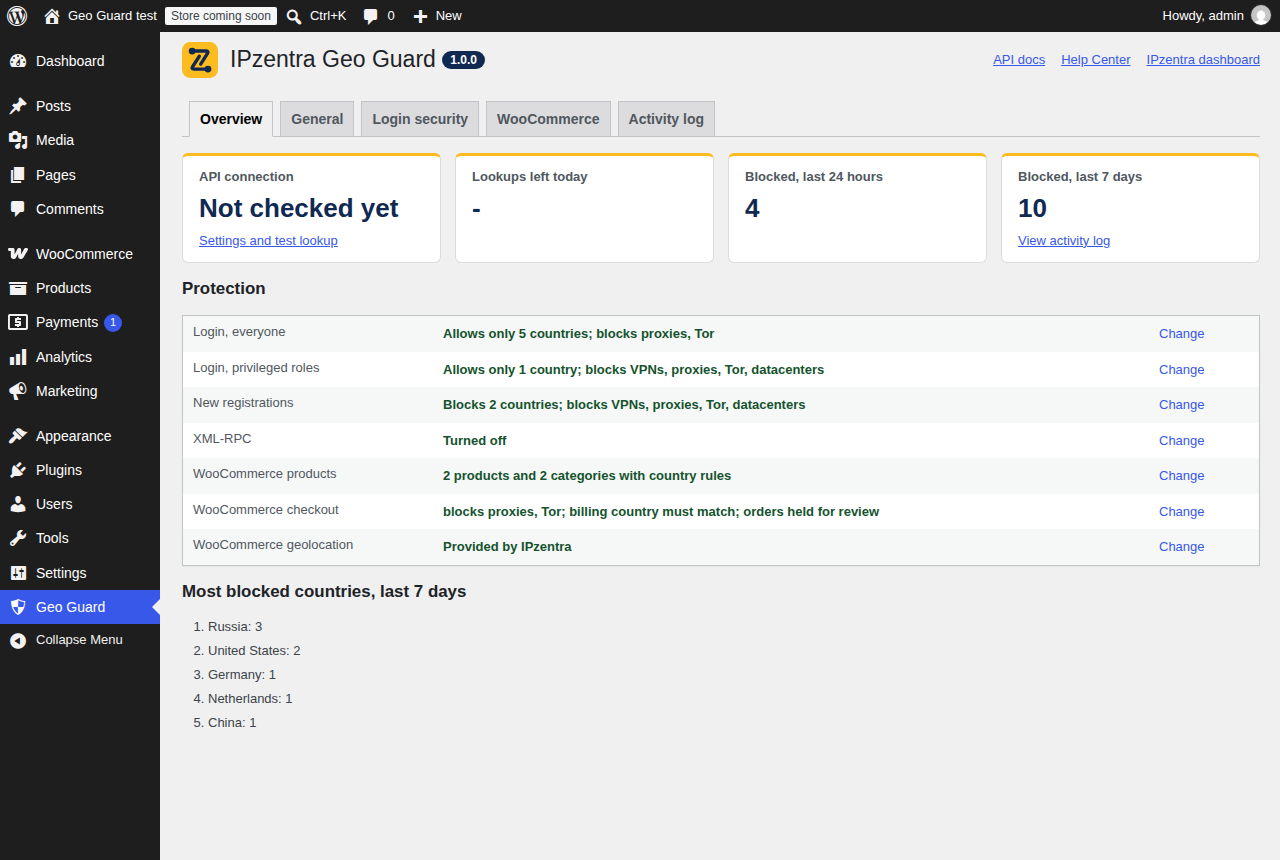
The Overview screen of the WordPress country blocking plugin shows whether the API is connected, how many lookups are left today, blocked attempts over the last day and week, and every rule that is switched on.
- Test any IP address straight from the settings screen.
- See blocked sign-ins, registrations and orders in the activity log.
- Each visitor is looked up at most once a day, so lookups stay low.
Set up WordPress country blocking in four steps
- Install the plugin. Download the zip above, then in WordPress go to Plugins, Add New, Upload Plugin, and activate it.
- Add your API key. Create a free IPzentra account, copy your key and paste it under Geo Guard, General. Click Add my IP so you can never lock yourself out.
- Check the connection. Use Test lookup with any IP address. You should see its country, network and risk level.
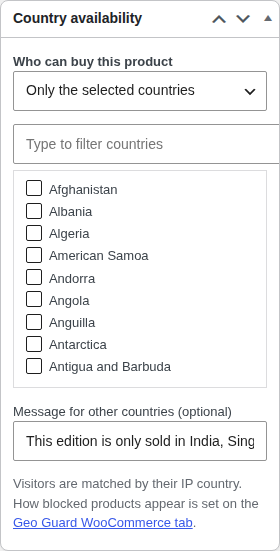
- Turn on your rules. Choose countries on the Login security tab. For shops, set product rules in the Country availability box on each product.
Behind Cloudflare or a proxy? Pick the matching Visitor IP source so the plugin sees each visitor's real address. More detail is in the API documentation and the Help Center.
Built for WooCommerce stores
Some products can only be sold in certain countries because of licences, shipping or local rules. With WordPress country blocking at product level, each product or category can be limited to the countries you choose.
- Blocked products cannot be added to the cart by any route, including the new block checkout.
- Every order gets a note with the buyer's IP country, network and risk.
- Risky orders can be refused, or held for review after payment.
WordPress country blocking questions
Is the WordPress country blocking plugin free?
Yes. The plugin is free and licensed under the GPL. It uses the IPzentra API, which needs an API key: every account starts with a 20-day free trial, and the Pro plan covers 20,000 lookups a day.
Does it slow down my site?
No. Lookups only happen when a rule needs them, such as a sign-in or a product with a country rule, and each visitor is looked up at most once a day. Pages without rules are never affected.
Will it block search engines?
Login and registration rules only apply when someone signs in or registers. If you choose to hide products by country, search engines crawling from other countries will not see those products either.
What if I lock myself out?
Add define( 'IPZGG_DISABLE', true ); to wp-config.php to switch every rule off, sign in, fix the rule, then remove the line. The plugin also refuses to save rules that would block your own login.
Does it work with caching plugins?
Yes. Pages that depend on the visitor's country are excluded from page caching automatically, so it works with WP Rocket, W3 Total Cache, LiteSpeed Cache and others.
Where can I download it?
Here on ipzentra.com today, and from the WordPress.org plugin directory once it is listed there. Both are the same plugin.
Protect your site in minutes
Download the WordPress country blocking plugin, add your free trial key and set your first rule in a few minutes. No card needed.